Introduction
There’s a shift happening in software development – not the usual framework-of-the-month hype, but something deeper. For the first time, we’re seeing tools that don’t just assist developers – they act like developers.
Google’s new tool, Jules, is the latest example. It’s part of a wave of agentic AI systems designed to go beyond code suggestion – to read your codebase, understand context, write features, run tests, and even deploy – all inside a browser.
But let’s not kid ourselves. These tools aren’t perfect. Some promise too much. Others deliver, but only under narrow conditions. Jules, Codex, Copilot, Mgx.dev – each of them has strengths, and each of them has critical flaws.
So, what do these tools actually do? Where do they fall short, and what do they mean for the way we build software next?
From ChatGPT to Codex
It started with ChatGPT. End of 2022. Most of us were poking at it out of curiosity, asking it to generate some boilerplate or help us draft documentation. It wasn’t bad – but the context window was small, the answers were hit or miss, and the knowledge cutoff made it useless for anything involving current libraries or APIs.
The turning point came when generative models like ChatGPT evolved into agentic tools. At first, these models helped with boilerplate and docs – useful, but shallow. Then GitHub Copilot brought LLMs into the IDE, closing the loop with real-time autocompletion and scaffolding.
But the real shift was agentic mode – tools like Jules and Codex that don’t just suggest, they act. They read your codebase, make changes, and run the code. That’s where we are now: AI tools that behave like junior developers inside your repo.
Agentic mode: the new standard
There’s a big difference between a chatbot that answers questions and an agent that edits your codebase. Most tools are still stuck in the first category – helpful, but passive. Agentic mode flips that.
In agentic mode, the AI doesn’t just generate suggestions – it acts. It reads your project, builds a contextual index, understands dependencies, and moves through files on its own. You’re not copy-pasting anymore. You’re delegating.
Let’s say you want to add a login window. With Jules or Codex, you don’t need to spell out every detail. Just give a high-level instruction, and the agent builds the UI, styles, logic, controller, even hooks up the DB. Username field, password field, “forgot password” link – done. It writes the code, saves the files, and commits the changes. You review and adjust.
That’s a massive shift. You’re no longer writing code line by line. You’re designing systems and describing functionality. The bottleneck moves from typing to thinking. The developer’s role becomes more architectural – understanding models, workflows, data structures, and how to communicate them clearly.
But the power of agentic mode isn’t only in building features. It’s also in what it can audit. Want to find outdated dependencies? Security risks? Poorly structured database models? Ask the agent. It can run static analysis across the project and give you answers in seconds.
Developers often compare Jules (Gemini), Codex (OpenAI), and Claude (Anthropic) for output quality. Each model handles logic, code structure, and vague prompts differently – and the choice can significantly affect the results. Gemini tends to handle heavier legacy code well, but many devs still find Claude or GPT-4 more accurate in day-to-day prompting. For now, you’re locked into whatever model the platform gives you – and that matters.
Build smarter, faster products with AI-powered development
We help you turn high-level ideas into working software using advanced tools.
CTO at Ralabs
Jules and Codex
Jules (from Google) and Codex (from OpenAI) aren’t just smarter versions of Copilot – they’re pushing toward a different experience entirely: full-stack, agentic coding in the browser. No IDE. No setup. Just a repo and a prompt.
Here’s how it works.
You connect an existing codebase – from GitHub, Bitbucket, whatever – and the tool creates a full project index. Not just reading open tabs or single files, but scanning the entire structure: models, endpoints, controllers, views. It builds the context once, then reuses it to handle multi-file changes, add features, fix bugs, write tests, even suggest commits.
And it’s not just for new code. These tools handle old, messy codebases surprisingly well. You can ask them to refactor outdated modules, find performance bottlenecks, run linting checks, or identify security issues. Think of it like having a junior dev who also happens to be your static analysis engine.
Jules goes a step further by running your project inside a container – no local setup required. Just say “run this,” and it handles the database, file storage, certificates, and all the config mess under the hood. You’re not writing shell scripts or fiddling with Dockerfiles. It figures it out and spins up the environment for you.
That’s powerful, but it comes with limits. Jules and Codex both run in the browser, so they’re slower than local tools. They’re also tightly coupled to their own LLMs – you can’t swap out the model like you can with Mgx.dev or Lovable, which support multiple LLMs and let you bring your own keys.
Still, the experience is clean. Codex is powered by codex-1, a version of OpenAI o3 optimized for software engineering. It was trained using reinforcement learning on real-world coding tasks in a variety of environments to generate code that closely mirrors human style and PR preferences, adheres precisely to instructions, and can iteratively run tests until it receives a passing result. It supports most major languages – JavaScript, Python, Ruby, Java – and popular frameworks across backend and frontend.
Jules, backed by Google’s infra, is especially good at managing heavier, more complex tasks in legacy codebases.
Deployment is the last mile – and it’s where these tools still struggle. Mgx.dev and Lovable support instant deploys with temporary URLs, like a Heroku for the AI era. Jules and Codex are getting there, but not quite production-ready. Sometimes deployments fail. Sometimes containers stall. Rate limits hit. You get cryptic errors and no fix. It’s early days.
But the direction is clear. These are serious tools for fast prototyping, auditing, and iterative dev work. And they’re built for a future where coding looks a lot less like “writing” and a lot more like “directing.”
Codex vs Jules: what they do well
Both Codex and Jules aim to change how developers write software, but they do so in slightly different ways – and depending on your priorities, one might fit better than the other.
Codex (OpenAI)
- Code-first intelligence – Codex is trained with a strong emphasis on real-world coding workflows. It understands developer conventions, PR etiquette, and testing logic – often producing code that looks and feels like it was written by a human peer.
- Instruction precision – Codex excels at following detailed prompts. If you describe a multi-step workflow or edge case, it tends to generate reliable, step-by-step logic and code that can pass tests without further editing.
- Cross-language fluency – It supports most major languages and is comfortable jumping between JavaScript, Python, Ruby, and Java with minimal drop in quality.
- Audit-ready mindset – From identifying outdated dependencies to suggesting test cases and refactors, Codex makes it easy to spot issues before they ship.
- Task decomposition – It’s particularly strong at breaking large tasks into smaller, manageable components – great for incremental builds and clean commit history.
- Infra-included setup – Jules shines when you want a clean, containerized environment instantly. Say “run this project,” and it sets up infra, config, DB, and certs – no manual DevOps needed.
- Project-scale awareness – Jules reads the whole repo, not just the file in front of you. That makes it better at coordinating changes across multiple layers – UI, backend, DB – in one go.
- Legacy resilience – It handles older, messier codebases well. If you’re working with something brittle or undocumented, Jules often gets the structure right and avoids introducing bugs.
- Proactive execution – Jules doesn’t wait to be told everything. It may rename, refactor, or add logic it deems helpful – risky, but powerful for fast iteration.
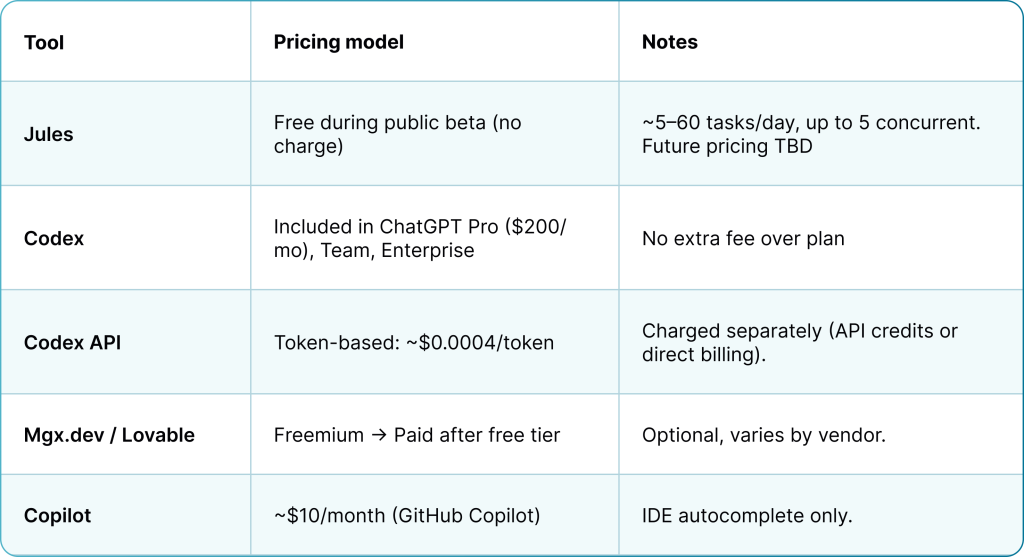
- Accessible pricing – Jules is free during public beta, bundled with Google accounts. No separate license needed.
Codex vs Jules: where they fall short
1. Model Lock-in
Codex is tied to OpenAI’s codex-1 model. Jules is locked to Gemini. You don’t get to choose or switch – no Claude, no GPT-4, no local LLMs. For teams that need flexibility or model comparison, Mgx.dev or Lovable are better suited.
2. Performance Constraints
Codex runs directly in the browser, which makes setup simple but often slows things down – especially with large files or long prompts. You might notice higher latency, laggy UI, or unstable behavior when working with complex or legacy codebases.
Jules avoids browser lag by running your code inside a managed cloud VM. While this gives it more processing power and access to your full repo, it can still feel slower than native IDE tools due to async behavior and cloud response times.
IDE-native tools like Cursor, JetBrains AI, or VS Code extensions remain faster and more stable, especially for real-time feedback, multi-file edits, or handling large-scale codebases.
3. Reliability Gaps
Even the best prompt can go sideways. Codex sometimes misunderstands scope or leaves gaps in logic. Jules, on the other hand, can hallucinate structure or misinterpret context. Both require reviews – these aren’t fire-and-forget tools yet.
4. Deployment Friction
Codex and Jules both try to abstract deployment, but neither is fully reliable. Temporary environments may fail to start or throw vague errors. By contrast, Mgx.dev and Lovable offer more consistent live deploys with preview URLs.
5. Limited Developer Control
With Codex, you work inside a clean browser shell – but you give up access to infra and config. No container tweaking, no direct script edits. Same with Jules. It’s prompting over precision – and that can frustrate seasoned devs.
6. Unrequested Behavior
Jules sometimes takes initiative – rewriting functions, refactoring logic, or renaming elements without being asked. Codex generally plays it safer, but it’s not immune. Proactivity helps when speed matters – but it can also break working code.
For all their strengths, Codex and Jules still need a human in the loop. Review everything. Stay in control. And know when to switch back to your IDE. – Jules may proactively make changes you didn’t request. Sometimes it’s smart, like fixing an import or suggesting refactors. Other times it’s distracting or even harmful – like changing logic that wasn’t part of the task.
Who wins in the new stack
No single tool gets everything right. If you’re looking for the “best AI dev tool,” you’re asking the wrong question. The right one is: what are you trying to do?
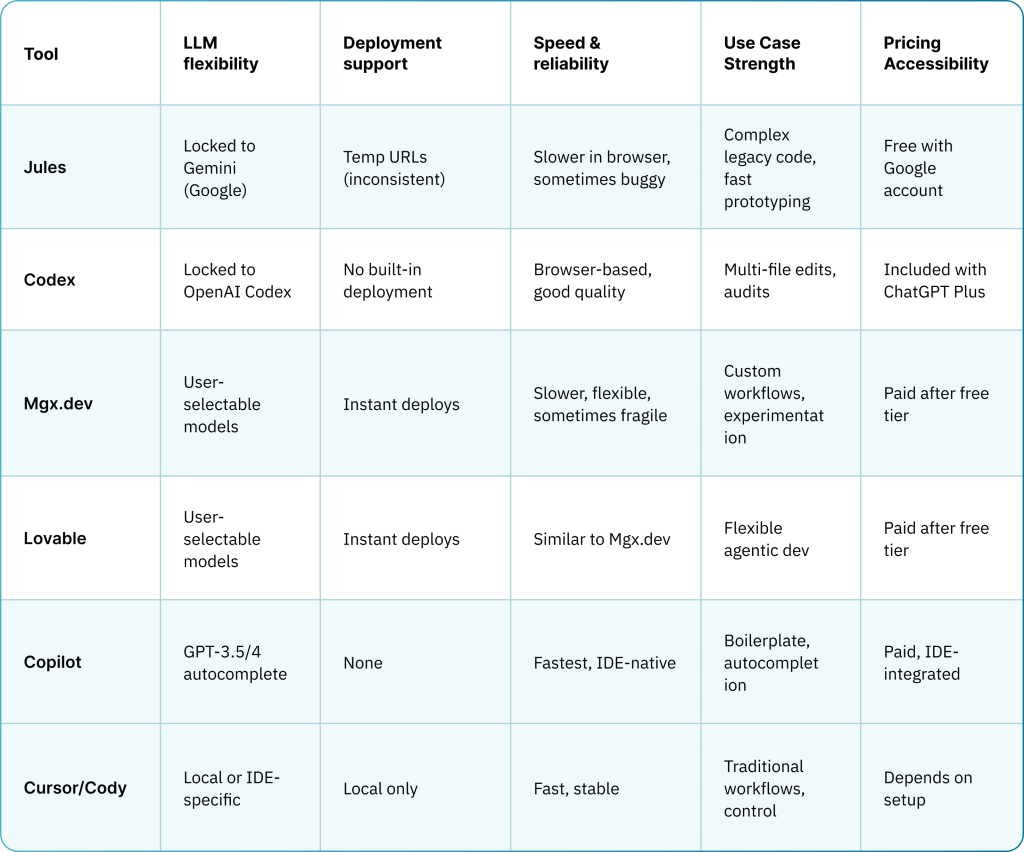
Here’s how they line up:
Codex (OpenAI)
Browser-based, runs your code in containers, builds features across files. Strong in code quality, handles old codebases well, and good at breaking down tasks. But lacks deployment, and you’re stuck with one model. Still, the dev experience is tight – especially for quick features and audits.
Strong on infra. It reads context, builds features, writes tests, commits changes, and even runs your project without config. Solid performance in complex legacy code. But it’s slow, closed, sometimes buggy, and deployment is hit-or-miss.
The tradeoff is always the same:
- If you want speed and real-time interactions, Copilot and local IDE tools remain unmatched.
- For multi-file reasoning and cloud-powered workflows, Jules, Codex, MGX.dev, and Lovable bring new capabilities—but trade off responsiveness and consistency.
- The right tool depends on whether you value real-time feedback, contextual depth, deployment automation, and how much latency you can tolerate.
You choose based on stack, use case, and tolerance for surprises.
There’s no perfect agent yet. But the direction is clear – and the players with real infra (Google, OpenAI, Replit) are building for mass adoption. The indie tools? Great for power users. But this race will be won by whoever makes “code → running app” as seamless and fast as possible.
Visual comparison table:
Price comparison table:
Engineering in the age of AI
When tools like Jules and Codex start doing the busywork, your value as a developer shifts. Writing syntax isn’t the hard part anymore. The hard part is knowing what to build, how to structure it, and how to explain it clearly.
If you give the agent a bad prompt, you get a bad implementation. If your project architecture is chaotic, the tool will multiply the mess. Your job becomes less about writing code – and more about designing systems and thinking ahead.
That’s where the T-shaped and E-shaped engineers shine.
- T-shaped: deep in one core skill (say, backend dev), broad in others (infra, testing, analytics).
- E-shaped: same as T, but with two or three deep areas – maybe fullstack + product thinking + devops.
With agentic tools, being deep in just one thing isn’t enough. You need to know how to break down a feature, how to write a clear prompt, how to guide the agent step by step. You need to think like a PM, write like a tech writer, and reason like a systems architect.
That’s why some devs love these tools – and others feel lost. The ones who treat coding like a craft, who know how to decompose a system and explain it cleanly, can build faster than ever. The ones who rely on trial-and-error and copy-paste? They get stuck in loops and blame the AI.
This is where we are now: design and clarity win. Prompting is a skill. Decomposition is a skill. Architecture is a skill. The rest, the agents can handle.
What comes next
We’re already seeing what this shift enables. Founders with no dev team spin up MVPs in a week. Product managers prototype flows on their own. Engineers go from idea to working feature in hours – not because they’re typing faster, but because they’re directing faster.
This is the real outcome of agentic tools: the rise of non-engineers and hybrid profiles. People who understand systems, but aren’t traditional devs, can now build. And experienced devs can do more in less time – as long as they stay sharp on design and control. We now have the luxury to build using bigger blocks without spending time on small decisions and challenges.
Expect this to grow fast. We’ve already seen multiple projects started by individuals who carved out two hours a day, played with Jules or Codex, and ended up with a functional product. Not just a demo – something usable, deployable, and reviewable.
Like Windows 95 made computers usable for the masses, tools like Jules could do the same for AI-driven software development. By abstracting away setup, infra, and toolchain complexity, these platforms let nearly anyone build and run applications.
Everything around coding is changing:
- Documentation gets auto-generated
- Test coverage improves by default
- Dev audits become part of daily flow
- Infra and deployment start to look like minor details, not major blockers
But none of this works if you lose control. Letting the AI guess what you mean is a fast way to create garbage. The value comes from knowing how to direct it – how to slice a problem into tasks, how to spot design flaws early, and how to review what’s being written in your name.
And that ratio people talk about? Ten devs to one AI? Maybe. But those ten won’t be coding. They’ll be directing. Designing. Making judgment calls. The agent does the work – the engineer makes it count.
If you’re building with AI today, ride the wave. If you’re wondering how – let’s build it together. Schedule a custom AI strategy call.