Introduction
At Ralabs, we stopped treating AI as hype a long time ago and started treating it as a tool — like Photoshop or Figma. Over several years, we have tried almost everything that appeared on the market: from the first image generators to agents that now work directly in Figma. In some areas, AI became a game changer; in others, it was just a nice demo that fell apart on a real project. Below, you can read about where we use it and why the designer, not the model, remains at the center of everything.
Rethinking graphic design
We started, like many others, with graphics. Those were still the days of Midjourney’s heyday: on one of the projects, we needed to quickly create many graphic assets, and AI seemed like an obvious solution. In practice, models of that generation produced an image that couldn’t be taken and immediately put into Figma, so the designer spent a lot of time in Photoshop polishing every image. It was time-consuming.
Now the situation is different. With Nano Banana Pro, Nano Banana 2, and GPT Images 2.0, we now use AI for many fundamentals — where appropriate. But one thing hasn’t changed: the final composition, style, and tone are set by the designer. The model provides the material, but the decision about what to do with it remains with the human. That’s how we ensure quality and a unique visual identity. And at the same time, the speed and efficiency of task execution.
Interestingly, with the development of AI, we have begun to involve more graphic designers in the design process than ever before. It sounds counterintuitive, but the logic is simple. Generating individual elements is not a replacement for creativity, but a way to remove routine. When a designer no longer has to spend hours drawing a background or texture, they can spend that time on what the machine cannot do: on the uniqueness of the solution, on capturing the client’s brand accurately, and on those details that prevent the design from being “just another generated layout.” AI broadens what designers can focus on. Efficiency grows precisely because the creative component doesn’t go anywhere — it simply stops drowning in technical work.
There is another practical bonus that clients especially appreciate. Thanks to rapid concept generation, we can show a fairly accurate look of the future product even before development begins — even if the final version involves 3D rendering. The designer generates a preview, the client reviews it, makes corrections, approves it — and only then does the work start. This saves weeks and money: we don’t build blindly but align on the direction at an early stage.
Vibecoding: when the designer steps into development
Separately, we experimented with how a designer can be involved in vibecoding, especially as support for MCP servers appeared in Figma and tools like Lovable and Figma Make grew alongside it. After all, designers have their advantages here: they understand visual requirements well and can see “by eye” what even an experienced front-end developer might miss. For simple sites and landing pages, these tools are perfect. And if you pair a designer with a developer, the result is fast and high-quality. We are sure that UX/UI designers will continue to play a bigger role in this space.
At this stage, Figma Make has been helpful for us for quick prototypes — to show the design to developers and clients on both current and potential projects. The difference with a clickable prototype in Figma is tangible: there, all states are “mocked up” in advance, and you just click through a prepared scenario. But here you literally feel how the future application will work — this is an entirely different level of product understanding.
And just as quickly, we can build a neat, working application for you based on your idea — one you won’t be ashamed to take to investors.
Vibedesign: the most controversial spot on this map
And this is where the most interesting and controversial part begins — vibedesign tools like Google Stitch and Claude Design. This is where the marketing noise is loudest.
Google Stitch is convenient if you are a product manager or founder and need to quickly create an entire flow to show designers or developers. It lives on an infinite canvas, allows minimal manual design editing, supports voice, and, importantly for us, has MCP. But what it generates is still just a draft. A good, fast one, but a draft that is still far from looking perfect — and always contains errors.
Claude Design is a different story. The quality of its designs is excellent — noticeably better than Stitch’s. It keeps a conversation going, remembers the context of the entire discussion, and lets you refine designs using both sliders and natural-language comments.
The trade-off is that getting your work out of Claude Design isn’t particularly smooth. Unlike Stitch’s canvas-based interface, Claude Design uses a preview-based workflow, similar to Claude Code or Lovable. You can export to PDF, PPTX, HTML, or Canva, but not directly to Figma. Even when using Claude Code as a bridge, the designs tend to lose some fidelity, and there’s still no native way to move them into Figma. Currently, the only option is a workaround — for example, routing them through Claude Code first. In other words, you end up with a beautiful design, but you’ll still need to spend extra time getting it into your actual design workflow.
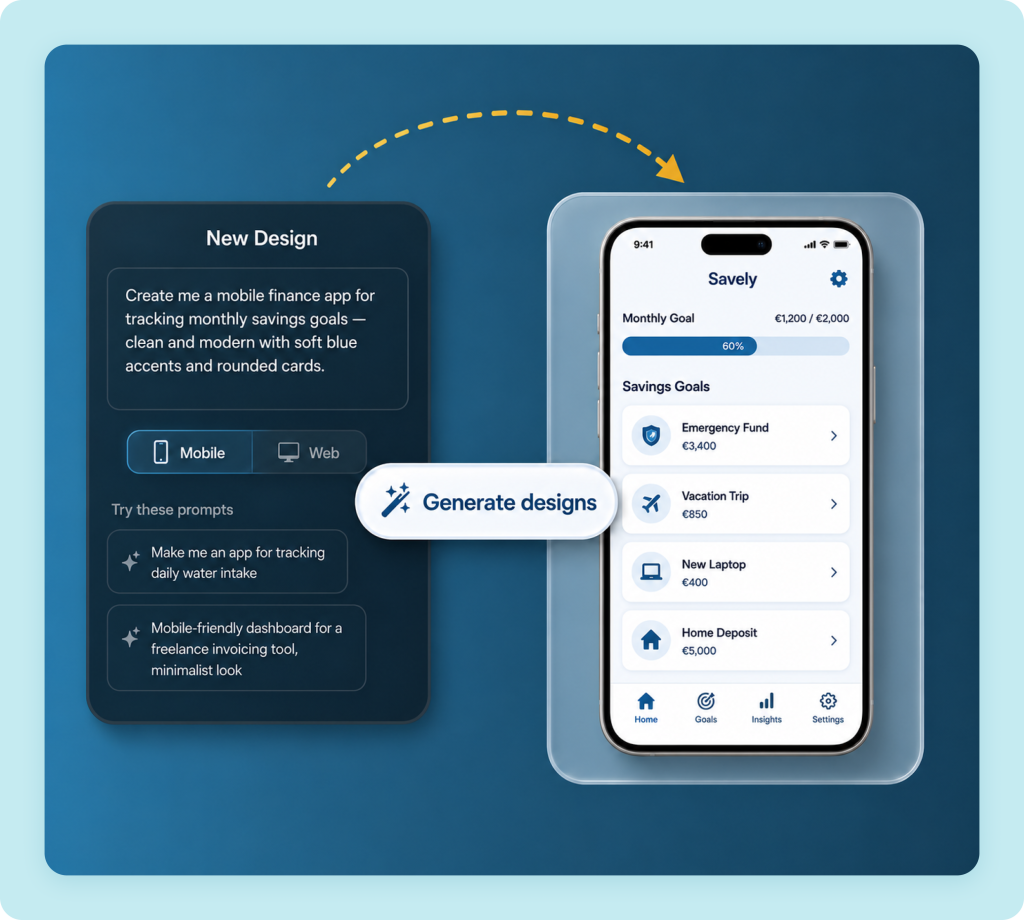
Despite all these “buts,” these tools are great for initial concepts, exploring design directions, and creating mood boards. At the start of a project, they save a lot of time and allow a person without a design or engineering background to build an entire website almost from scratch. Both tools export to a vibe-coding environment, and Stitch also supports MCP. Our role here is to prevent this stage from becoming a dead end. We take a quick concept the client made themselves and bring it to production quality: we align the system, resolve issues that arose during generation, and fit everything into a real brand and real development. The client gets both a fast start and a high-quality design, ready for development, at the end.
Agents directly in Figma: what it was
all for
The real breakthrough for designers has been working directly with agents in Figma. When the Figma MCP server started working in both directions, the designer could set a task through Claude, Cursor, or Codex for the agent to perform directly on the canvas. This changed the very approach to work. All the tedious tasks go to the agent, while you focus on complex UX and UI. If you need to duplicate dozens of similar screens in different states, update copy, tidy up components, styles, and variables, and give everything meaningful names — this is done almost instantly. Moreover, an agent can build a design or its components from scratch. It’s impossible to list everything in one article, so we will write separately about working with AI agents in Figma — there is enough material for a full-fledged breakdown.
And recently, Figma built such agents directly into its application — now, for a basic scenario, you don’t even need to connect Claude or anyone else. For me, this solved my biggest issue with Stitch: you create the entire design with a prompt in the same way, but you edit it however you like — both manually and with a prompt. No feeling of limitation: I can completely rework a generated concept for myself. And in the same way, a person far from design can come in here and create or edit anything using natural language. For now, the feature is in beta and free (no credits are deducted), and it already looks very promising. The only question is: what will the credit pricing be after release? I expect this feature to see widespread adoption.
Why is this beneficial for both the client and us? Designer agents work quickly and are truly effective in many tasks: they take repetitive work off designers’ plates, the monotonous work that would otherwise take hours. And during this time, the designer does what truly affects the product — making it more convenient for the user and more precise in achieving the client’s business goals.
A prompt is all it takes: Figma’s native agent generates full component documentation, states, variants, and usage examples included.
Many tools. One foundation
We have listed many points where our designers work with AI: image generation, vibecoding, vibedesign, and agents in Figma. All of these are wonderful tools that make our deliverables better and more efficient than ever. But they complement what the designer already had. The final design is still created by a human. The most complex UX tasks are performed by humans. AI simply gives them more room — and more opportunities to realize their creative potential.
That is why we are not chasing “let AI do everything.” We use it where it truly gives results and hold back where it currently only imitates quality. To us, this is the professional approach — and this is precisely what we bring to every Ralabs project. Want to see how this translates into real product design? Explore our UI/UX design services and cases.