Introduction
Your ERP does not talk to your CRM. Your HR system does not sync with your project management tool. Someone on your team fills that gap manually – every day, across time zones, with a spreadsheet. This is not an edge case. It is how most companies operate.
Business process automation can eliminate much of this manual work and deliver measurable benefits:
- reduced operational costs
- fewer errors
- faster decision-making
AI may be part of the solution, but successful automation starts with process clarity, system integration, and operational readiness. Whether it fixes the problem well – or creates a more expensive one – depends on how prepared a company is before the project starts. Many automation projects struggle for the same reason: the business was not fully prepared before implementation began. This article will help you figure out whether yours is.
Why Automation Scope Is Almost Always Underestimated
The most common risk in automation projects is not technical. It is scope creep: the gap between what a client thinks needs to be built and what the automation actually requires once you look closely.
A workflow that looks simple on the surface often has significant hidden complexity. Edge cases the team handles without thinking. Manual steps that exist because someone built a workaround three years ago and it stuck. Data formats that do not quite match between systems. Exception handling that lives in one person’s head and nowhere else.
The pattern repeats across projects of every size. A client expects a project to take a thousand hours. Once the workflow is mapped in detail – including the systems involved, the edge cases, the security configurations on the legacy ERP – the real scope is five thousand hours. That gap is scope creep. It is not a client error. It is a structural problem: clients see the surface of a workflow, not the infrastructure underneath it.
Most digital transformation initiatives fail to achieve their intended goals. The primary reason is not flaws in the technology itself, but the fact that companies attempt to automate chaotic, inefficient, or poorly documented processes, which inevitably leads to scope creep and project misalignment.
Before talking to any vendor, document the workflow end to end. Not the ideal version – the actual version. Who does what, when, with which systems, and what happens when something goes wrong. The more clearly you can describe what happens today, the more accurate your timeline and budget will be.
The clearest signal that a project will go well is a client who can describe their need in concrete terms – not “we want to automate this with AI,” but “we need data from system A to flow into system B when X happens, and the system needs to handle these specific exceptions this way.” That clarity comes from business knowledge, not technical knowledge. If you do not have it yet, that is where to start – before any vendor conversation.
What Low-Code Automation
Really Means
Understanding the scope is the first step. The second is understanding the tools. Most automation today does not require building from scratch – and knowing what low-code platforms can and cannot do will shape how you scope the project from the start.
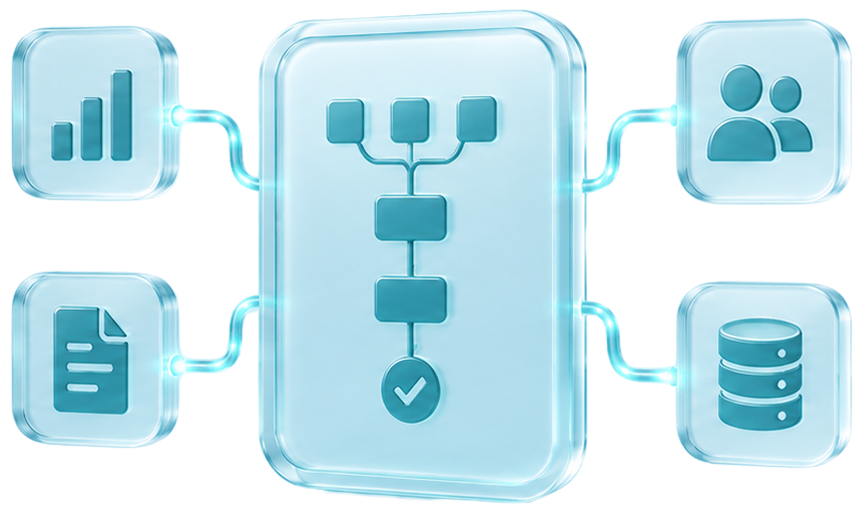
Low-code and no-code business process automation has changed what is possible without a large engineering team. Rather than building integrations from scratch, specialists use platforms – n8n, Boomi, Zapier, SnapLogic, Celigo, Workato – to configure pipelines from prepackaged components. Connectors, triggers, data-mapping steps, and error handlers are assembled into workflow automation pipelines that automatically move data between systems.
This approach covers most business process automation use cases: cross-system data synchronization, document routing, approval workflows, and notification pipelines. Low-code automation is faster to deploy than custom code and easier to maintain. When requirements change, a specialist reconfigures the pipeline rather than rewriting it.
The exception is when a workflow is highly specific, data volumes are extreme, or the connected systems have no standard API. At that point, the economics shift toward custom development. Knowing where that line is – and being honest about it early – is one of the most important things a vendor can offer in a scoping conversation.
How to Choose the Right Platform
The platform choice comes down to two parameters: security requirements and data volume.
For enterprise companies in regulated industries – pharma, fintech, healthcare – the right tools are Boomi, Workato, Celigo, or Azure Logic Apps. They handle high throughput, complex corporate security configurations, and compliance requirements that lighter tools cannot meet.
For smaller or more contained implementations – a marketing team syncing a CRM to an email tool, an HR team automating onboarding – Make, n8n, or Zapier are faster to deploy, easier to maintain, and cost-effective at lower volumes.
The hard decision is not which tier to use. It is knowing when a project has outgrown the lighter tier. There is a point at which adding one more requirement to a Make or n8n workflow pushes it beyond what the platform handles well. A vendor with real integration experience will tell you when you have hit that line – before you build past it.
For a practical look at how n8n is used in real-world automation projects, read Roman Rodomansky’s recap of Valencia’s first n8n meetup and the key discussions around low-code integration platforms.



COO & Co-Founder
at Ralabs
Your Legacy Systems Are Probably
the Biggest Risk
The platform you choose matters. But before any platform can do its job, it needs to connect to your existing systems – and that connection is where most enterprise automation projects hit their first real obstacle. If your systems have clean, well-documented APIs, integration is relatively straightforward. If they do not – if you are running an ERP from 2008, a custom internal database with limited documentation, or a system behind complex corporate security – getting through firewalls, VPN configurations, and custom authentication can take four or five days. The automation logic on top of it: one day.
This imbalance has become the norm for modern businesses. According to Gartner’s analysis, the average enterprise spends up to 70–80% of its IT budget simply on “keeping the lights on” (run the business) – maintaining legacy infrastructure and manually consolidating data. As a result, only about 20% of the budget remains available for genuine innovation.
This does not make automation impossible. It means the timeline needs to account for the connection work separately from the automation logic. A realistic vendor will tell you this upfront. One that gives you an optimistic estimate without asking about your infrastructure has probably not worked in environments like yours.
The challenge profile also differs by company size. For smaller companies, the systems are usually modern and easy to connect – the risk is on the business side: unclear requirements, undocumented exceptions, and processes that were never fully mapped. Both are solvable. But they require different approaches, different timelines, and different questions during discovery.

Don't Automate a Process That Still Changes Every Week
Automation performs best on stable processes – where the inputs, the logic, and the desired outputs are well-defined and unlikely to change frequently. If the process you want to automate is still being figured out, or if the business requirements around it often shift, building automation on top of it can create rigidity rather than efficiency.
Low-code platforms that are easy to reconfigure may be a better fit for evolving workflows than complex custom pipelines that require engineering time for every update. The choice of platform should reflect how the process will change, not just how it works today.
Go-Live Is Not the Finish Line
Systems change after go-live. Upstream applications get updated. A field name changes in one system, and the pipeline breaks. Edge cases emerge in production that were not anticipated during testing.
For smaller implementations – a simple data sync between two tools, a marketing automation pipeline, this is usually manageable with documentation and a support contract. For larger enterprise integrations, you may need someone internally who understands how the integration was built and can coordinate changes over time.
The best integration in the world becomes a liability if no one inside the business can maintain it. Knowledge transfer means your internal team receives documentation, runbooks, and hands-on walkthroughs of how the integration was built – so they can troubleshoot, adjust, and extend it without calling the vendor every time something changes. Make sure this is part of the engagement scope from the beginning, not something that gets added at the end.
What Successful Automation Projects Have in Common
The clearest wins in automation are not incremental improvements. They are full eliminations of manual processes – workflows that people used to spend time on every day and now happen automatically.
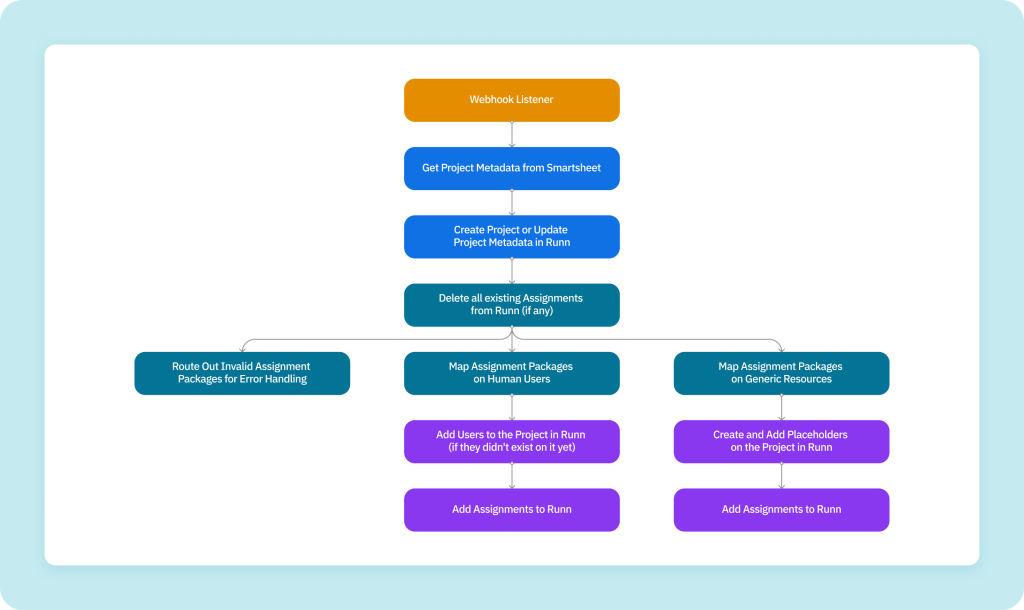
A recent example: our medical client needed to keep resource data synchronized between two systems. MS Project handled project forecasting – who works on which project, for how long. Runn handled people management – headcount, assignments, availability. Same underlying data, different purpose, no bridge between them.
Before the integration, managers were chasing colleagues across time zones just to reconcile headcount data that should have been the same in both systems. Someone needed to contact a colleague in Australia just to find out why a person’s allocation had not been updated. We built an integration pipeline in n8n that connects four systems – resource allocation now propagates automatically. Managers have one accurate view without contacting anyone. The manual work is gone.
The elimination of a manual process translates directly into reduced human overhead, fewer errors, and faster decisions. That is the pattern that defines a successful automation project: not a percentage improvement on something that already worked, but the replacement of something that should never have been manual in the first place.
A second example sits at the other end of the complexity scale. APC, a pharma and biotech company, was managing resource planning, HR, and CRM data across four disconnected systems – Salesforce, Sage HR, Runn, and Power BI. Reconciling that data was a manual process, which meant reporting delays and inconsistencies every time something changed upstream.
We built an ETL pipeline that extracts data from Salesforce and Sage APIs, transforms it according to business rules, and synchronizes it with Runn automatically. The same pipeline consolidates data into structured datasets for Power BI. Idempotent execution means the migration can restart safely without creating duplicates.
Thousands of records now sync across platforms. Migration checks run in 16 seconds when no source data has changed. Power BI reports run on clean, consolidated data – no manual preparation required.

The two business process automation examples are different in scale and stack. The pattern is the same: manual work that existed because nobody built the bridge. Once the bridge exists, the manual work stops.
A Simple Readiness Check Before
You Start
Most business process automation projects don’t fail because of technology. They fail because the business wasn’t ready before the vendor was hired. Here is a quick way to check where you stand.
- Your team spends recurring time moving data between systems manually
- The same information exists in multiple tools and frequently gets out of sync
-
You can clearly describe how the workflow works today - including exceptions
and manual workarounds - You know which specific process you want to improve and why
- Errors, delays, or manual work in this process have a measurable business cost
- You know who will own the integration after deployment
-
You are willing to invest time in discovery and workflow mapping before
implementation starts -
You see automation as an operational improvement initiative, not a one-time
technology purchase
If that describes your situation, you are ready to have a productive first conversation. A good vendor will take it from there – mapping the workflows, identifying the right scope, and telling you honestly what is worth automating and what is not.
Tell us about your workflow. We’ll tell you what’s automatable, what isn’t, and what a realistic build looks like.
No commitment. Senior specialists on the call. Response within 1 business day.

Senior Automation Engineer at Ralabs
AI Accelerates Experts. It Doesn't Replace Them.
Modern AI tools can accelerate implementation, documentation, and troubleshooting. They do not replace architectural thinking or integration experience.
The most difficult part of business process automation consulting is rarely dragging connectors between systems. It is understanding infrastructure, security constraints, data flows, and operational risks. Companies often discover this after working with vendors who know how to prompt AI tools but lack deep expertise in integration.
AI can speed up specialists. It does not replace specialists.
Ralabs brings 6+ years of iPaaS and automation expertise, 100+ deployed integration workflows, and a track record of a 70% average reduction in operational costs across client engagements.
If you are mapping out where automation can bring the most value, we are happy to start with a scoping conversation.