Enterprise Systems Integration for a Global Pharmaceutical Company

Duration: March – July 2026 (~4 months)

Customer location: Belgium  Australia

Industry: Healthcare
Services: Project ManagementQA & TestingSystems Integration
Tech stack: Azure/EntraJavaScriptMS Projectn8nPythonRunnSmartsheetVBA macros
Dedicated team: Integration Engineer QA Engineer Project Manager

The client

A global pharmaceutical enterprise specializing in oncology treatments, operating across several regional entities with core stakeholders in Belgium and Australia. The engagement centered on an internal tool for project and resource management, separate from the company’s clinical work — helping their project managers plan workload and capacity across a large, distributed organization.

Why the client chose Ralabs

The client ran a vendor selection process for a capacity-management tool. Once the platform was chosen, they needed the systems integration services the tool didn’t provide — and were introduced to Ralabs through a trusted partner in the resource-management space.

Two criteria drove the decision: fit-for-purpose and simplicity — avoiding an over-engineered, heavily customized solution — alongside cost. A more powerful competing approach had already been rejected for being too complex and expensive relative to the value it added.

The challenge

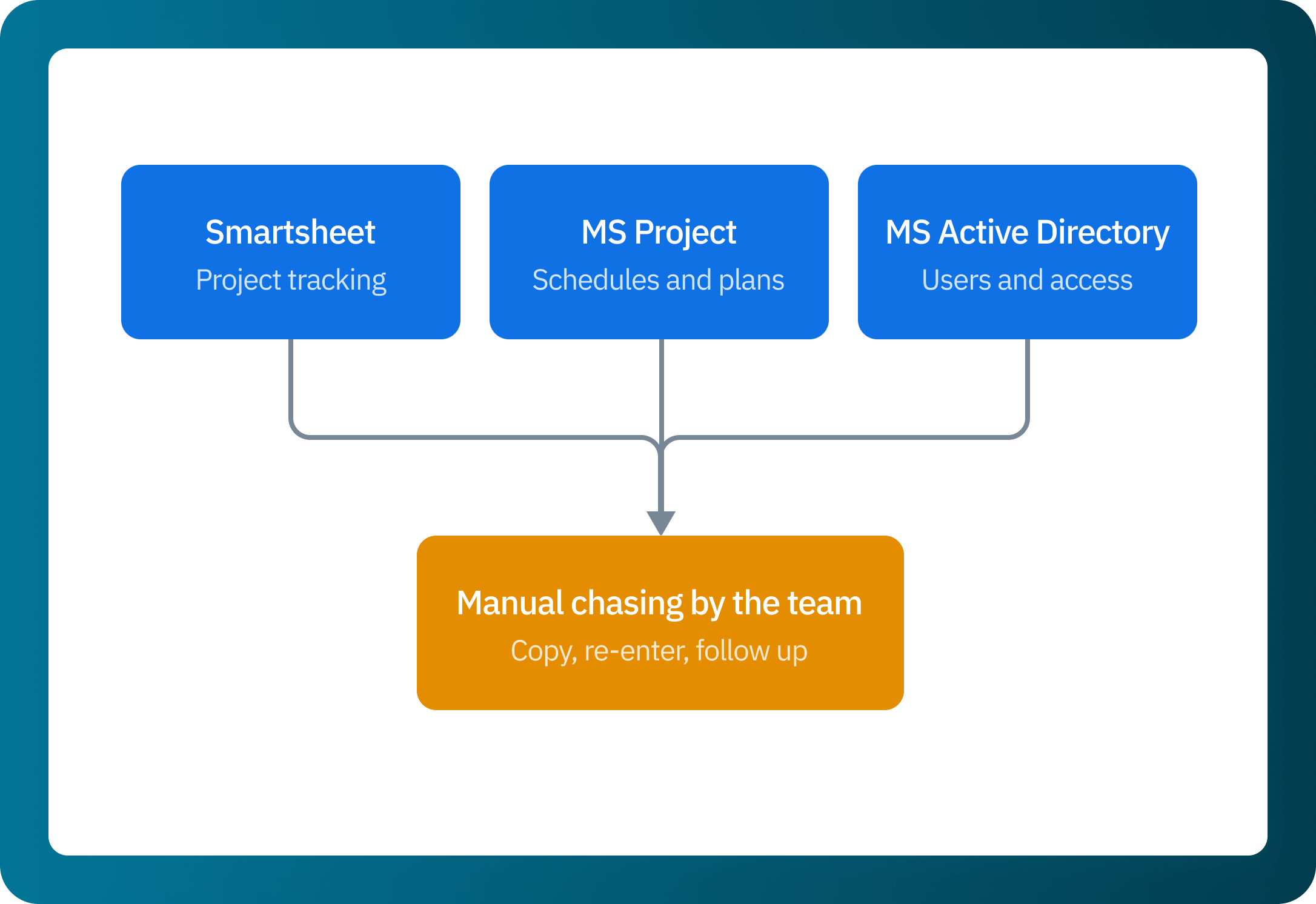
The client’s project managers relied on three to five disconnected tools to plan work and manage people. The same underlying data lived in separate systems, so every change had to be reconciled by hand — often by emailing colleagues across time zones.
Key challenges included:

01

No single source of truth

Project and resource data were spread across MS Project, Smartsheet, and Azure/Entra. Nothing kept them aligned, so managers had no reliable, unified view of who was working on what.

02

Automating a legacy desktop application

MS Project is a legacy desktop app with no vendor support and slated for deprecation, offering no easy way to automate or integrate with it. Reliably extracting its data meant writing VBA macros as a mandatory dependency — the technical obstacle.

03

A specialized legacy-scripting knowledge gap

Automating MS Project meant writing VBA macros — a dated, rarely used scripting approach the team wasn’t an expert in. They closed the gap by using AI to help author and troubleshoot the VBA the integration required — an approach that shows how Ralabs handles legacy system modernization.

04

Coordinating a large, distributed enterprise

Stakeholders spanned multiple countries and time zones, and enterprise processes moved deliberately. Keeping scope, decisions, and delivery aligned required disciplined project management throughout.

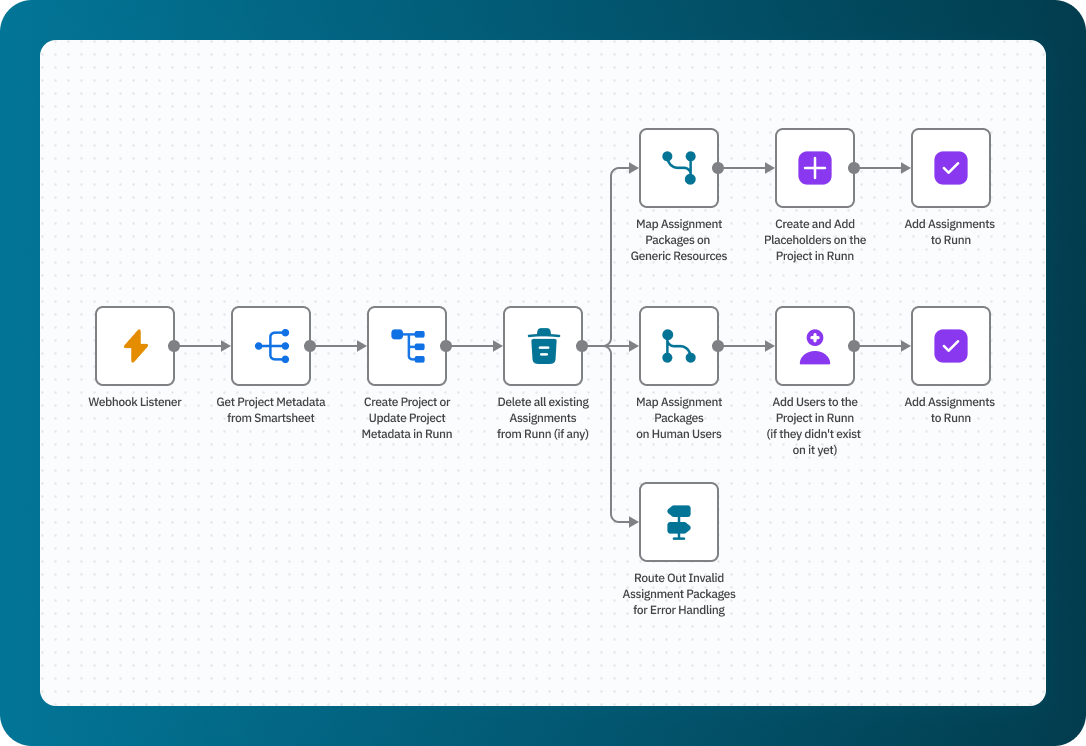
Resource management integration worflow

What was done

Ralabs built an event-driven data integration pipeline in n8n (an open-source workflow automation tool) that connects the client’s four core systems and keeps resource data synchronized automatically. When an assignment changes, the update now propagates to the central planning tool — either on a schedule or when a manager triggers a data consolidation — with no manual reconciliation.

Discovery and scoping
Mapped the four source systems and defined how project and resource data should flow between them.

MS Project connectivity

Built a VBA macro and configured an n8n source connector to extract task-level scheduling data from the legacy desktop application.

Source system integration
Connected Azure/Entra (resource data) and Smartsheet (portfolio system of record) through custom API integration development.

Data mapping and transformation
Standardized incoming data into a single model and routed it to Runn, the central capacity-planning platform.

Nominative and generic resource handling
Supported both named individuals and role-based placeholders (e.g. “Quality Associate”) used for early-stage planning.

Validation and error handling
Routed invalid assignment packages out of the flow for review, so bad data never reaches the target system.

Delivery cadence
Led weekly technical and core team meetings to review potential risks and blockers, align on the project roadmap and milestone timelines, and prepared weekly project status reports through UAT and Go-Live.

Implemented features:

Event-driven sync pipeline

A webhook listener triggers the workflow, which can also run on a schedule or on manual demand. Resource allocation propagates to Runn automatically, replacing manual updates.

Legacy MS Project connector

A purpose-built VBA macro and n8n Webhook handle the legacy system integration — extracting scheduling data from the unsupported desktop application and bringing previously siloed project data into the pipeline.

Multi-system aggregation

Smartsheet, Azure/Entra, and MS Project feed a single consolidation flow, giving managers one accurate view of people and projects without contacting anyone.

Nominative and generic resource mapping

The pipeline maps named individuals and creates role-based placeholders, so teams can forecast workload and demand before specific people are assigned.

Assignment validation and routing

Invalid assignment packages are automatically separated for error handling, keeping the target system clean and reliable.

How the collaboration worked

The team worked in a lightweight, Kanban-style flow suited to an integration project, delivering in increments.
Communication ran on a steady weekly rhythm across two standing calls:

  • A technical call with Ralabs’ engineers and the client’s technical stakeholders.
  • A core-team / roadmap call covering timeline, blockers, and action items across all stakeholders.

Alongside the calls, the project manager maintained a set of delivery artifacts: a weekly roadmap, an action-items list, and weekly reports on risks, blockers, completed scope, next priorities, and any actions pending on the client’s side. A risk register, risk-review sessions, and a RACI matrix were established early, with ad-hoc check-ins as needed. The engagement ran on a fixed-price contract.

Results:

Manual reconciliation eliminated

Resource updates now propagate automatically across four systems. Managers no longer email colleagues across time zones to keep records aligned.

One source of truth

Project and resource data now consolidate into a single planning view, replacing three-to-five disconnected tools.

Delivered within budget on a fixed-price contract

Scope was adapted to evolving requirements while holding to the agreed commercial terms.

Foundation for future migration

With projects unified in one system, replacing the deprecated legacy tool later will be substantially simpler.

What the team has to say

Tech stack

Working directly with Ralabs’ engineers made everything faster and easier — the flexibility to skip the usual process layers was a real advantage.

Client
Technical lead

Looking ahead

Ralabs continues to provide support and maintenance for the integration. By unifying the client’s projects into a single system, the work also lays the groundwork for a smoother move off the deprecated legacy tool when the client retires it.

Let’s talk solutions

    By submitting this form, you agree to our Privacy Policy.


    Roman Rodomansky

    CTO & Co-Founder at Ralabs

    Andrii Yasynyshyn

    CEO & Co-Founder at Ralabs

    Other сases

    You got it right!

    Only 21% of people can identify an accessible visual.

    Your question